

Our most common support question is why Clever Logger does not agree with the min/max readings on a vaccine fridge.
There are a number of good and bad reasons why they are different. This article discusses the causes of the variations, if your should be concerned and what to do about it.
Before I begin, I need to stress that there is no such thing as “the fridge temperature”.
You have experienced large temperature fluctuations within a room. One spot may be blasted with the air-conditioning while another spot is in the sun.
Fridges are the same. There is no single temperature that the fridge is. The front is different to the back. The top is different to the bottom. Different parts will heat up and cool down at different rates.
Figure 1 compares readings from two loggers in the same (domestic) fridge. One logger is near the fridge door, while the other is at the back of the cabinet.
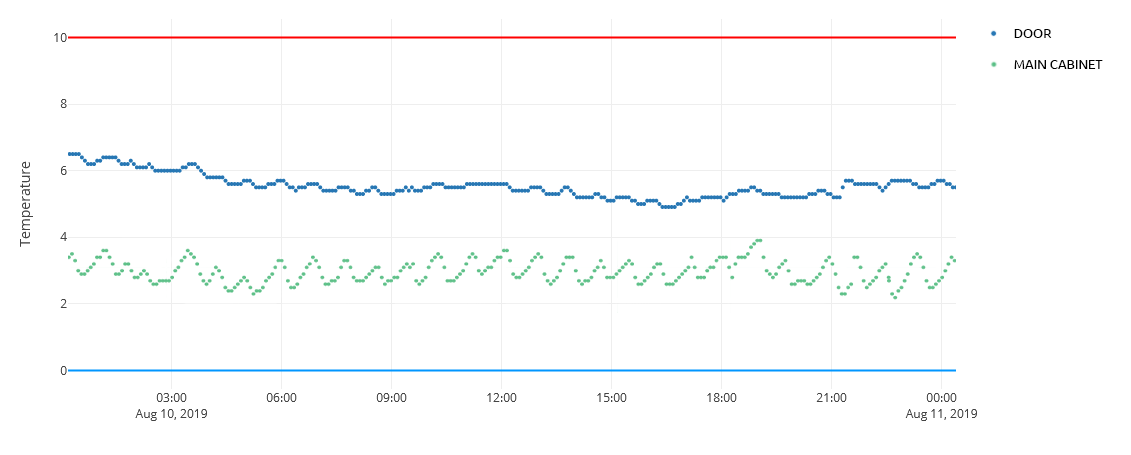
Remember, these loggers are in the same fridge, less than a metre apart.
In a large commercial coolroom, the temperature variations can be even greater. At any one moment, a sensor near the door can show as much as 5° difference in temperatures as one near the back, or another surrounded by pallets and out of the air flow.
Vaccine fridges are meant to be fan forced to ensure a uniform temperature inside.
THEY ARE NEVER A UNIFORM TEMPERATURE.
Air is lazy. It takes the path of least resistance. It will look for shortcuts. It doesn’t move through enclosed spaces.
If you overstock a fridge, you are forcing the air to take a very select path through the fridge. Along this pathway, the temperature is likely to be substantially lower than elsewhere in the fridge.
Every shelf needs to have gaps between the boxes to allow air to move freely. Do not use solid based containers.
Overstocking is the leading cause of large temperature variations within a fridge.
If you move the logger around an overstocked fridge you will notice a substantial change in temperature.
You may be able to find a location that is similar to the displayed temperatures, but the rest of the fridge may not be compliant. The only solutions are to reduce the stock in your fridge or get a larger fridge.
If the fan within the vaccine fridge is slowing down or failing then you won’t have uniform temperature in the fridge.
The solution is to fix the fridge or purchase a new fridge.
Chances are you can easily tell us where the Clever Logger is within your fridge, but can you tell us where the temperature sensor is for the fridge? Most people can’t.
It is often located outside the main fridge compartment. Only a technician can access it. It isn’t even within the fridge.
One brand of vaccine fridge even prides itself in placing the temperature logger sensor right next to the fridge sensor to reduce the discrepancy. While it is great for making the results look good, it totally fails to address many of the problems that you will read about in this article.
Now we are going to get slightly more technical.
Different objects respond to changes in temperature at different rates. The objects thermal mass will impact how quickly it will heat up or cool down.
For example, if you were to take a 240ml can and a 2L bottle out of the fridge at the same time, the can will reach room temperature faster than the 2L bottle.
When it comes to measuring a fridge’s temperature, are you wanting to monitor the air temperature (which changes rapidly when you open the door), or the product that is in the fridge?
The answer (hopefully) is “the product”.
But the product isn’t all the same size with the same latency. Some items will heat up and cool down faster than others. Which product has “the temperature”?
Different sensors and loggers will have different latencies. Which one is “correct”?
There is no correct answer. Instead, we recommend that you use a device that responds slightly faster than the product you are monitoring. Loggers like Clever Logger will respond faster than a small vaccine vial.
You can slow down the responsiveness of a logger by enclosing it in a box. That’s a useful trick if it is responding too quickly.
As a general rule of thumb, if your logger is telling you it is all OK and your fridge is telling you it is all OK, then it is all OK. If, however, either one is telling you there is a problem then work out why.
“Accuracy” is a funny term. It actually refers to how different the reading could be from the true reading. “Inaccuracy” would be a better term for it. It means that if a device has an accuracy of 0.5° then the temperature it is showing could be up to 0.5° warmer or cooler than the actual temperature.
Clever Logger has a digital sensor that is accurate to 0.4°C, which is fairly standard across brands, and way more accurate that most older analog sensors. The newer models have accuracies of 0.2° or better.
If the Clever Logger gives you a temperature of 3.0°, the actual temperature could be anywhere from 2.6° to 3.4°.
If you had two devices with this level of accuracy and placed them in an environment of exactly three degrees, one could tell you it was 2.6° and the other could say it was 3.4°.
And both would be right (within the limits of their accuracy).
If, however, the accuracy of the logger or the sensor drifts beyond the allowable value then it’s broken!
Keep in mind, however, that there are two sensors – the logger and the fridge.
You don’t know which one is faulty. It is amazing how many people automatically assume it is the logger that is faulty because “we just had the fridge serviced a month ago”.
Our usual suggestion is to place a second logger in the fridge. If they agree with each other then the fridge sensor is faulty.
This next section focuses on why you can’t simply look at the Clever Logger app and the fridge and compare the live results.
Cool rooms, fridges and freezers all work pretty much the same way…
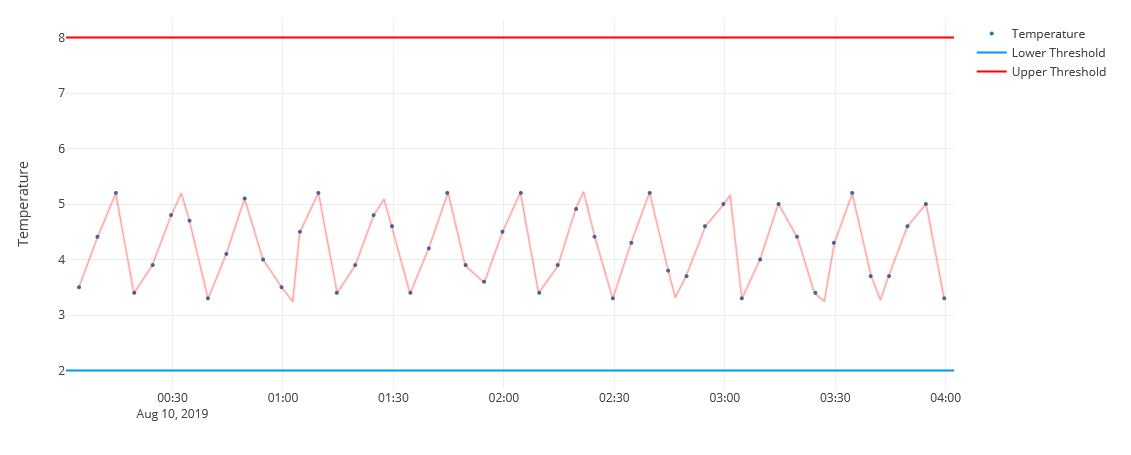
If you are using a temperature logger, you can see this cycle illustrated on your temperature graphs. See Figure 2.
If we zoom in on the graph to take a look at three data points, you can see that in the space of 10 minutes, there is a temperature change of nearly 2°C. See Figure 2.
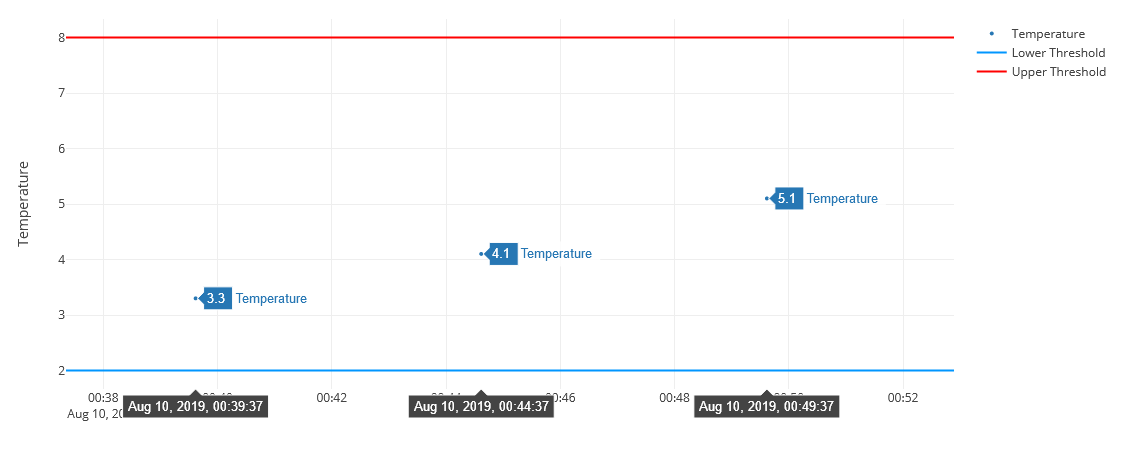
So imagine you used a thermometer to take a single reading of, for example, 3.2°. Then, a few minutes later, you grabbed a logger data point that said it was 5.1°, you would think that one of the devices was wrong.
Neither reading is wrong. They are just taken at different points in the temperature cycle.
Clever Logger will update the temperature shown every 5 minutes (depending upon the sample rate). That means you could be looking at a reading that was taken up to 5 minutes ago.
By the way, that’s OK. There is no expectation that you are seeing “live” data. It can be a couple of minutes old.
This is why we think it is more useful to compare the minimum and maximum readings over a period of time, not the instantaneous readings.
The answer as to why two devices don’t agree about temperature is most likely to be a combination of the factors above – a sort of inaccuracy salad.
The most important thing to understand is that temperatures fluctuate. Rather than worrying about a stray reading here and there, look for a consistent average temperature.
If that average is too high or too low, adjust your fridge. If the peaks and troughs are outside your limits, adjust the timing of your thermostats.
If the temperature fluctuations are wild, move your logger or put it in a box to get it out of the air flow.
Once thing you should never do, is adjust your logger’s readings to match what you want it to say or what another device is reading. That is using your logger the way that a drunk uses a lamp post – for support rather than illumination. If you believe your logger is faulty, discard it and get another one.

The National Association of Testing Authorities (NATA) is the recognised national accreditation authority for analytical laboratories and testing service providers in Australia. It is an independent, not-for-profit organisation that provides independent assurance of technical competence.
NATA accredits organisations to perform testing and inspection activities for their products and services. This gives consumers the assurance they need to make safe, healthy and reliable choices .
| QUICK SPECS | |
|---|---|
| Model | CLD-01 |
| Type | Temperature only with Dual Sensors |
| Temperature Range | Internal sensor: -23°C to +60°C External sensor: -40°C to +80°C |
| Humidity Range | N/A |
| Battery Type | CR2450 |
| Battery Life | Replace every 12 months |
| Accuracy |
Internal Sensor: ±0.3℃ (0℃ to +60℃) ±0.3℃ to ±0.7℃ (other temperatures) External Probe: ±0.5℃ (-20℃ to +40℃) ±1℃ (other temperatures) |
| Offline Memory | approx 24 days logging at 5 minute intervals |
| QUICK SPECS | |
|---|---|
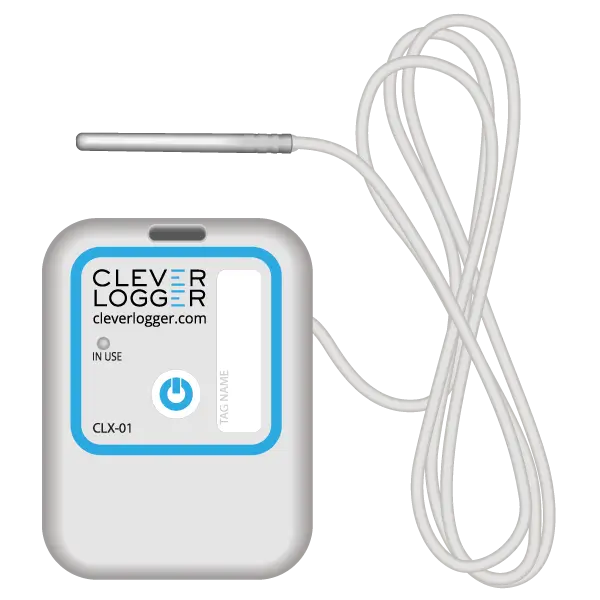
| Model | CLX-01 |
| Type | Temperature only with Probe |
| Temperature Range | -40°C to 60°C Can operate up to 80°C for short periods |
| Humidity Range | N/A |
| Battery Type | CR2450 |
| Battery Life | Replace every 12 months |
| Accuracy | ±0.5℃ (-20℃ to +40℃) ±1℃ (other temperatures) |
| Offline Memory | approx 24 days logging at 5 minute intervals |
To prove it, we’ll send you a Starter Kit to try out for a whole month.
Set it up, have a play, explore the features – obligation free.
If you love it, just let us know.
If not, just send it back.