
If your organisation has a strict IT department, connecting any new device to the network can involve more than simply entering the Wi-Fi password.
That is not necessarily a bad thing. Your IT team is responsible for protecting the organisation’s systems, data and users. When an unfamiliar device appears on the network, asking questions is exactly what they should be doing.
The good news is that a Clever Logger gateway has fairly straightforward network requirements. In most cases, IT can place it on a guest network, an isolated VLAN or another restricted section of the network while still allowing it to communicate with the Clever Logger cloud.
The trick is to involve IT early and give them the information they need.
A Clever Logger system normally contains two different types of devices:
The loggers themselves do not join your Wi-Fi network. They do not receive an IP address and they do not have access to your computers, servers or files.
Only the gateway connects to your local network, using either Ethernet or Wi-Fi. The gateway then communicates with the Clever Logger cloud so your temperature records can be viewed and alarm notifications can be sent.
This distinction is worth explaining to IT. You are not asking them to connect every logger in every fridge to the corporate network. You are asking them to provide controlled internet access to one gateway.
Do not wait until installation day and then discover that the Wi-Fi password cannot be provided or that all new devices require security approval.
It may also help to explain why the system is operationally important. Clever Logger provides continuous temperature monitoring, automatic record keeping and notifications when a fridge, freezer or gateway has a problem.
In many medical, laboratory and food environments, this is not simply another gadget asking for internet access. It supports an important monitoring or compliance process.
For many organisations, the easiest solution is to connect the gateway to a guest Wi-Fi network.
A properly configured guest network is separate from the organisation’s main internal network. Devices connected to it can access the internet but cannot normally access staff computers, shared folders, servers, printers or other internal systems.
That makes it a practical option for devices such as:
The gateway gets the internet connection it needs, while IT keeps it isolated from sensitive systems.
There are, however, a few things to check.
Some guest networks use a captive portal. This is the screen that appears in a browser asking a visitor to accept conditions, enter an email address or request an access code. A gateway cannot complete that type of browser-based sign-in process.
The Wi-Fi network therefore needs to provide direct access after the network name and password have been entered.
Clever Logger gateways support 2.4 GHz and 5 GHz Wi-Fi using WPA or WPA2. Hidden Wi-Fi networks and WPA-Enterprise networks are not currently supported.
Ask IT whether the guest network:
If the answer is yes, the guest network may be all you need.
Larger organisations may prefer to place the gateway on a dedicated Internet of Things, or IoT, VLAN.
A VLAN allows IT to create a logically separate network for particular types of equipment. Devices on that VLAN can be prevented from communicating with the organisation’s normal computers and servers.
IT can then create firewall rules that allow the gateway to reach only the external services it needs.
For example, the rules might:
Block access from the gateway to internal corporate systems
Allow outbound HTTPS connections to Clever Logger services
Allow DNS so domain names can be resolved
Allow access to an approved time server
Block unnecessary communication to other destinations
This gives IT much more control than simply placing the gateway on the general staff network.
From the user’s point of view, there is no practical difference. The gateway still receives readings from the loggers and uploads them to Clever Logger. The network separation happens behind the scenes.
IT departments will sometimes prefer an Ethernet connection because it can be easier to manage, monitor and restrict.
Ethernet also avoids problems associated with weak Wi-Fi coverage, changed Wi-Fi passwords and wireless authentication settings.
The gateway requires DHCP. It does not currently support manually entering a static IP address. However, IT can usually create a DHCP reservation so the gateway receives the same IP address each time it connects.
A Power over Ethernet option is also available where the gateway needs to receive both network access and power through the Ethernet installation.
Whether Ethernet is the best choice will depend on the location of the gateway and the availability of network cabling near the monitored fridges.
The gateway initiates outbound connections to the Clever Logger cloud. Your IT team does not need to expose the gateway directly to the public internet or create general inbound access to your network.
The main requirements include:
The gateway uses secure HTTPS connections when communicating with the Clever Logger cloud. Some corporate security systems intercept encrypted traffic so it can be inspected before being sent onwards. This may be called SSL inspection, TLS inspection, HTTPS inspection, break and inspect or deep packet inspection.
Clever Logger gateways cannot connect correctly when this inspection is being applied to their traffic. IT may therefore need to create an exception for the gateway or for the required Clever Logger domains.
Our Information for IT page contains the current list of required domains, protocols and ports. It is better for IT to create rules using domain names rather than fixed IP addresses because the IP addresses associated with cloud services can change.
Every organisation has a slightly different approval process, but IT may ask you for some or all of the following:
Explain that the gateway collects temperature and, where applicable, humidity readings from Clever Logger devices and uploads those readings to the Clever Logger cloud.
IT may require the gateway’s Wi-Fi or Ethernet MAC address before allowing it onto the network.
The MAC addresses can be found in the gateway details within the Clever Logger web app or mobile app.
Tell IT whether the gateway will use:
IT may want to know the building, room and network outlet where the gateway will be installed.
This information is also useful if someone later needs to troubleshoot or replace the device.
Send IT the Clever Logger Information for IT page rather than trying to describe every technical requirement yourself. This page contains the current gateway domains, protocols and port requirements.
The gateway does not need access to staff computers, file servers, patient management systems or other internal business applications.
IT can isolate it using a guest network, VLAN, subnet and firewall rules.
The loggers collect temperature and, for relevant models, humidity information. The gateway uploads monitoring data to the Clever Logger cloud and receives configuration information such as logging settings.
You can adapt the following wording when contacting your IT department:
We are installing a Clever Logger gateway to provide continuous temperature monitoring for our fridge/freezer.
The temperature loggers communicate wirelessly with the gateway and do not connect directly to our network. The gateway requires an Ethernet or Wi-Fi connection with outbound internet access.
It can be placed on a guest network or isolated IoT VLAN and does not require access to internal computers or servers.
The gateway requires DHCP, DNS, HTTPS access to the Clever Logger services and access to an NTP time service. SSL or HTTPS inspection needs to be bypassed for the required connections.
Clever Logger provides detailed gateway, domain, port and security information on its Information for IT page. The Clever Logger support team is also available to answer technical questions.
Providing this information at the start will usually prevent a long exchange of vague questions between you, IT and Clever Logger support.
Network access is only part of the setup.
Clever Logger also uses email to send:
Ask IT to make sure Clever Logger emails will not be blocked, quarantined or delayed by the organisation’s spam filtering system.
Phone notifications through the Clever Logger app are extremely useful, but email is still an important part of the system.
Some IT departments will approve the gateway after reviewing the technical information. Others may require a security questionnaire, change request, risk assessment or discussion with the supplier.
That is fine.
Clever Logger is already used within hospitals, government departments and large organisations with tightly controlled networks. We are happy to discuss the gateway’s requirements with your IT team and work within reasonable network security restrictions.
Your IT department does not have to choose between protecting the network and allowing reliable temperature monitoring.
In most cases, a guest Wi-Fi network, isolated VLAN or restricted Ethernet connection can provide both.
To prove it, we’ll send you a Starter Kit to try out for a whole month.
Set it up, have a play, explore the features – obligation free.
If you love it, just let us know.
If not, just send it back.
| QUICK SPECS | |
|---|---|
| Model | CLD-01 |
| Type | Temperature only with Dual Sensors |
| Temperature Range | Internal sensor: -23°C to +60°C External sensor: -40°C to +80°C |
| Humidity Range | N/A |
| Battery Type | CR2450 |
| Battery Life | Replace every 12 months |
| Accuracy |
Internal Sensor: ±0.3℃ (0℃ to +60℃) ±0.3℃ to ±0.7℃ (other temperatures) External Probe: ±0.5℃ (-20℃ to +40℃) ±1℃ (other temperatures) |
| Offline Memory | approx 24 days logging at 5 minute intervals |
| QUICK SPECS | |
|---|---|
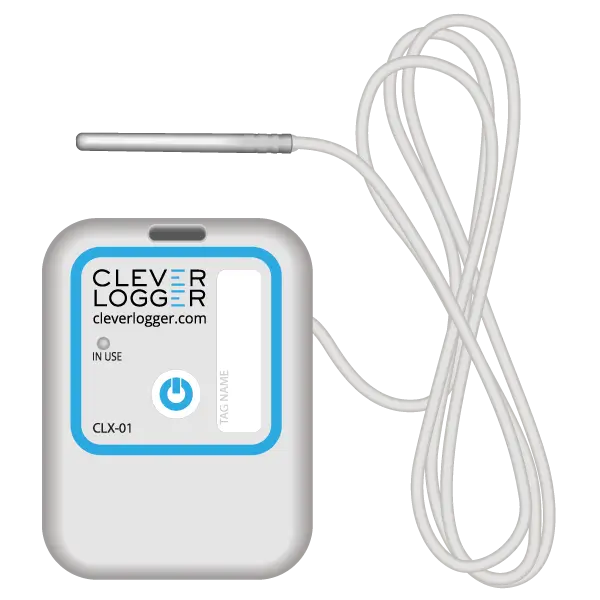
| Model | CLX-01 |
| Type | Temperature only with Probe |
| Temperature Range | -40°C to 60°C Can operate up to 80°C for short periods |
| Humidity Range | N/A |
| Battery Type | CR2450 |
| Battery Life | Replace every 12 months |
| Accuracy | ±0.5℃ (-20℃ to +40℃) ±1℃ (other temperatures) |
| Offline Memory | approx 24 days logging at 5 minute intervals |